Crumbs on Clay

Built on Clay since 2023.

Clay pulls company and people data from many providers and runs AI on it, row by row. We use it to build plays that run on thousands of accounts every day, with checks at every step. Below is one of them, taken apart.

What one play looks like inside Clay.

Each row is one person at one account. Follow a row from the moment it's found to the moment it's ready to send, and see where the gates stop the ones that shouldn't go any further.

Role switch · one play, end to end 8 stages · around 70 columns

Example row 1New Head of IT · logistics group · 600 FTE · Netherlands

  1. 01Source

    Source

    Who enters the table, with the company and person data the gates need.

    Role switch: new Head of IT, six weeks in
    13 columns
  2. 02AI

    Qualify

    Does this account fit your sellable market? Is this the right person?

    Fits: 40 sites, IT team growing
    9 columns
  3. 03CRM

    Exclude

    Checked live against your CRM: a customer, or an open deal?

    Not a customer, no open deal
    6 columns
  4. 04Data

    Email

    A waterfall across several providers, only for rows past both gates.

    Email at the third provider, verified
    7 columns
  5. 05AI

    Research

    Where your offer meets their situation, from news, hiring and their stack.

    ERP move planned, a peer case fits
    10 columns
  6. 06AI

    Write

    Two short messages, written in the buyer's language from the start.

    Two messages, in Dutch
    9 columns
  7. 07Check

    Check

    A gate on language, length and facts, and no job title quoted back at the reader. What fails waits for review.

    Language, length, facts: all pass
    10 columns
  8. 08Push

    Push

    To your sending tool and CRM, only after you approve the campaign.

    Queued. Sends once you approve.
    6 columns
A typical play runs around 70 columns; the split differs per play. About half the columns are formulas and rule checks that tidy and route. Example rows are made up.

Gates come early.

A row that fails a gate stops there. Email lookups, research and writing are spent only on rows that can go out.

Waterfalls fill the gaps.

If the first provider has no verified email, we ask the next one, then the next.

The language is set first.

Country and region decide the language before a word is written. Each message is drafted for its market, in its own language.

Six habits behind every table.

A table that works on a hundred rows can still fall apart on ten thousand. These habits keep ours working at full size.

  1. 01

    Never a blank table.

    Every new play starts as a copy of the nearest table that already works, tuned prompts included. We change only what the play and the client need.

  2. 02

    A pilot before the market.

    Up to 150 rows first. We read the output row by row and fix what's off before the play touches the full market.

  3. 03

    A check after every draft.

    Every message is checked: the right language, the right length, facts that match the research, no job title quoted back. What fails goes back for review instead of going out.

  4. 04

    Cost per row, watched.

    Because the expensive steps sit behind the gates, we know what a row costs before the full run, not after.

  5. 05

    Nothing goes out unapproved.

    We push to your sending tool only after you've approved the campaign. Then messages go out from your sellers' own accounts.

  6. 06

    One parent table per play.

    Each play has one parent, reused across clients, so a fix found for one client becomes the default for the next. We reuse the structure, never the data.

In our Clay, or in yours.

The same tables and checks, built by the same team. What changes is whose workspace they live in, and who runs them day to day.

Option 01

We run it in our Clay

The tables live in our workspace and connect to your sending tool and CRM Our workspace Sending tool CRM
Workspace
Ours
Clay licence
None needed on your side
Data and AI costs
Ours
Sending tool
Yours, so messages go from your sellers' own accounts
Day to day
We run it, and keep adding triggers as the first ones prove themselves
Together
A shared dashboard and a review every two weeks
Option 02

We build it in your Clay

The tables, sending tool and CRM all live in your workspace. We build, train and stay on call. Your workspace Sending tool CRM Crumbs
Workspace
Yours
Clay licence
Yours
Data and AI costs
Through your own plan
Sending tool
Yours, wired to your CRM
Day to day
Your team, after hands-on sessions with us
Together
We stay on call while it settles. You keep all of it.

You can switch between the two later. Ways to work together

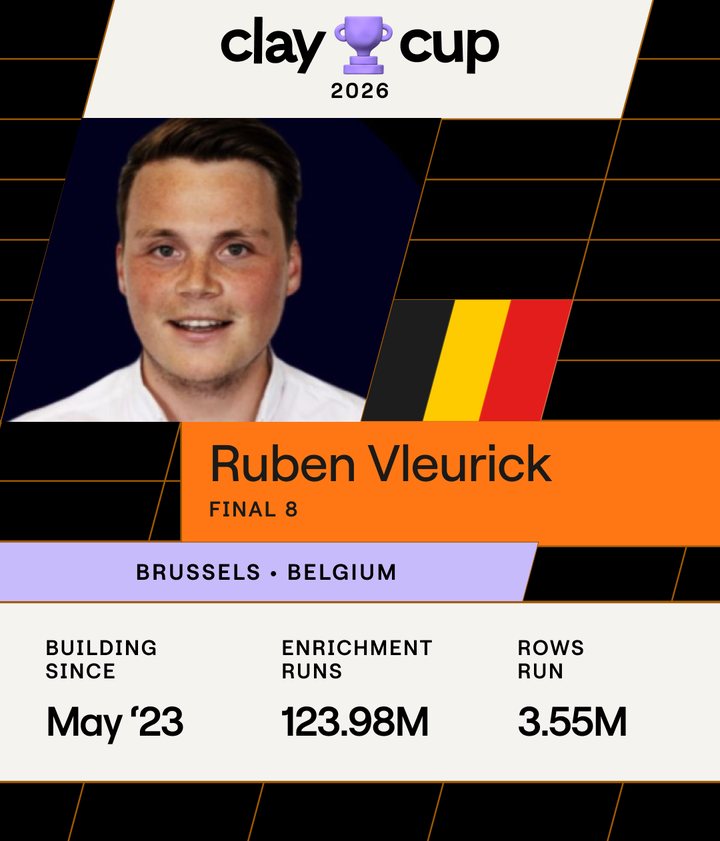
Clay Cup 2026 card: Final 8, building on Clay since May 2023, 123.98 million enrichment runs, 3.55 million rows run.
Clay Cup 2026

Top 8 out of more than 200 builders.

Clay Cup is a live building competition run by Clay, where builders from around the world solve tasks against the clock.

More than 200 builders, with the top 8 highlighted
More than 200 buildersThe top 8

A good test of speed. The rest of this page is the daily work.

What sits around Clay.

Clay is where the table lives. Around it: the data it reaches, the models that read and write, the tools that send, and your CRM on both ends.

Reached through Clay

30+ data sources

People, company and contact data, plus our own crawls for what nobody sells.

people, companies, emails
Inside the AI columns

AI models

For qualifying, research and writing. Picked per column, for the task and the cost.

research, messages
Clay

Where every table lives

  • Sourcing
  • Enrichment
  • AI columns
  • Checks
Sending

Your sending tool

Email and LinkedIn, through the sending tool you already use. Messages go from your sellers' own accounts.

approved messages
Both ends

Your CRM

Customers and open deals come in, so they stay out. Hand-raisers go back, with the research behind them.

exclusions in, hand-over out

The tools around Clay change per client. The table in the middle is what we build.

Questions about Clay.

Do we need a Clay licence?

No. When we run it, everything lives in our Clay workspace and the data and AI costs sit with us. You only bring the sending tool. If you'd rather own the system, we build it in your workspace, on your own licences.

Can we take it over later?

Yes. We build the same system in your own Clay, wired to your sending tool and CRM, and run hands-on sessions for the people who will take it over. From then on, it's yours to run.

Which data providers do you use?

It depends on the market. We pick from the 30+ data sources we reach through Clay and chain them in waterfalls, so a gap at one provider doesn't stop a row. Where no provider has the data, we crawl it from public websites ourselves.

Who owns the data?

Your CRM data stays yours. We read only what keeps customers and open deals out, plus a do-not-contact list and a look at won and lost deals. When we run it in our workspace, the output lands in your own CRM and sending tool: hand-raisers, the research behind them and approved messages. Built in your own Clay, the tables are yours as well.

Want to see a table like this built for your market?

Tell us about your market, and we'll show you which play we'd start with.